Pre-send QA for marketing email
Your email looked perfect.
The checkout link still 404’d.
Your preview tool shows you how a campaign looks. SendGuard scans your campaign like a paranoid email lead — the message your ESP actually delivered, links wrapped and headers stamped — and tells you what’s broken. First report in about 60 seconds.
No signup. Add one address as a test recipient and send, the way you’d send to a colleague.
Works with campaigns sent from Klaviyo, Mailchimp, HubSpot & more
In our own scans: 1 in 6 campaigns had a link that returned a 404
Typical result: 3.2 issues found per campaign, on average
Based on 800+ real marketing emails from 89 brands, Oct 2025 – Jul 2026.
We don’t render your email in Outlook or Gmail — your preview tool already does that well.
Black Friday – VIP offer
As delivered · received 08:31
Broken checkout link
click.example-esp.com/CL0/… → /checkout?bf2025 → 404
Merge tag in the subject line
"Hi {{FirstName}}, your VIP code…" — didn’t resolve
SPF, DKIM and DMARC
All passed at the receiving server
Looks vs works
Everything below renders perfectly.
None of these is a rendering defect. Every one of these emails looked exactly the way it was designed to look — right font, right layout, right in Outlook — and the link still 404’d, the header was still missing, the merge tag still went out to the whole list.
Your preview tool answers the first question. SendGuard answers the second, by reading the message your ESP actually delivered: after personalisation, after link wrapping, after the headers were stamped on. Some preview suites run a link check alongside their previews. If yours does, good — run both. Two link checks are better than one.
But the visual pass and the functional pass are different jobs, and in most teams only one of them happens on every send. The flagship campaign gets the careful review. The Tuesday re-send to non-openers, the segment split, the subject line someone swapped at 4pm — those go out on the strength of a review you did on an earlier version. This is the pass that costs you nothing to run on all of them: unlimited scans on every paid plan, no overage.
“Hi {{FirstName}},” — a merge tag that never filled in
What the rendering shows you
It renders faithfully. Right font, right layout, and the tag sitting in the copy exactly where the template put it. Catching it means a human spotting it at 40% scale in the third of twelve previews — that’s attention, not a pass or a fail.
What SendGuard reports
We read the message after your ESP rendered it, so a tag that survived this send is a tag that didn’t resolve here. We match the tag syntaxes of the major platforms — Mailchimp, Liquid and Handlebars, AMPscript, Marketo, Dotdigital, Listrak, Responsys, ActiveCampaign and more — plus unclosed delimiters, and we name where it survived: the subject line, a link, an image’s alt text or the body.
No List-Unsubscribe header on a bulk campaign
What the rendering shows you
Nothing to render. It’s an SMTP header your ESP stamps on at send — it isn’t in the picture, at any size, in any client, on any device.
What SendGuard reports
We read the header your ESP actually emitted: whether it’s there, whether it carries a real https:// or mailto: target, whether that target is insecure http://, and whether List-Unsubscribe-Post is exactly the one-click form Gmail and Yahoo ask bulk senders for. This check reads the header itself, not the page behind it.
Every click routed through a tracking domain you didn’t pick
What the rendering shows you
The button says “Shop now” either way. Click wrapping happens at send — your template holds your own destination URL, never the tracking host a subscriber actually resolves through.
What SendGuard reports
We pull the tracking host out of the redirect chain we just followed and tell you which one your links resolved through: your ESP’s shared click domain, or a branded one aligned to your sending domain. Same for the open-tracking pixel your ESP injected — we report that it’s there and what it points at, so nothing about how your clicks and opens are recorded is a surprise.
The checkout link 404s
What the rendering shows you
A screenshot of a dead link and a screenshot of a live one are the same picture — in every client, on every device.
What SendGuard reports
We follow the link your ESP wrapped, hop by hop to the destination, recording the status and the time each hop took, and flagging any plain-HTTP hop hiding inside an HTTPS chain. A link that comes back blocked by bot protection is retried in a real browser before we call anything broken — and only a 404, a 410 or a DNS failure earns that word. Anything we can’t settle is reported as unverified, not as an alarm.
SPF, DKIM or DMARC didn’t pass on the way out
What the rendering shows you
No visual form at all. Authentication is settled between two mail servers before there is anything to look at — there is no pixel of it anywhere on the page.
What SendGuard reports
We read the Authentication-Results header a receiving mail server wrote on your message and report the SPF, DKIM and DMARC results it recorded — what a receiver concluded about the message you sent, not a reading of your DNS. We also compare the Return-Path your ESP used against your visible From domain, and flag a mismatch when SPF or DMARC didn’t pass.
You’re not choosing between the two passes. You’re choosing whether the second one happens at all.
Try it on a campaign you’re about to send
First report in about 60 seconds
- 1
Add your workspace email as a test recipient
Copy the address from the right and add it to your test recipients list.
- 2
Hit "Send test" from Klaviyo, Mailchimp, or wherever
Works with any ESP — no integration needed. Your ESP builds and sends it exactly as it always does.
- 3
Get a report on the message that arrived
The failing hop and its status code, the tag that didn't resolve, the header as your ESP wrote it — each with a fix.
Test the email your ESP actually sends
Send from your ESP, or forward as attachment.
- First report in ~60 seconds
- No account needed
- 17 checks
- Works with any ESP
Works with Mailchimp, Klaviyo, HubSpot, Brevo, and any ESP
The report
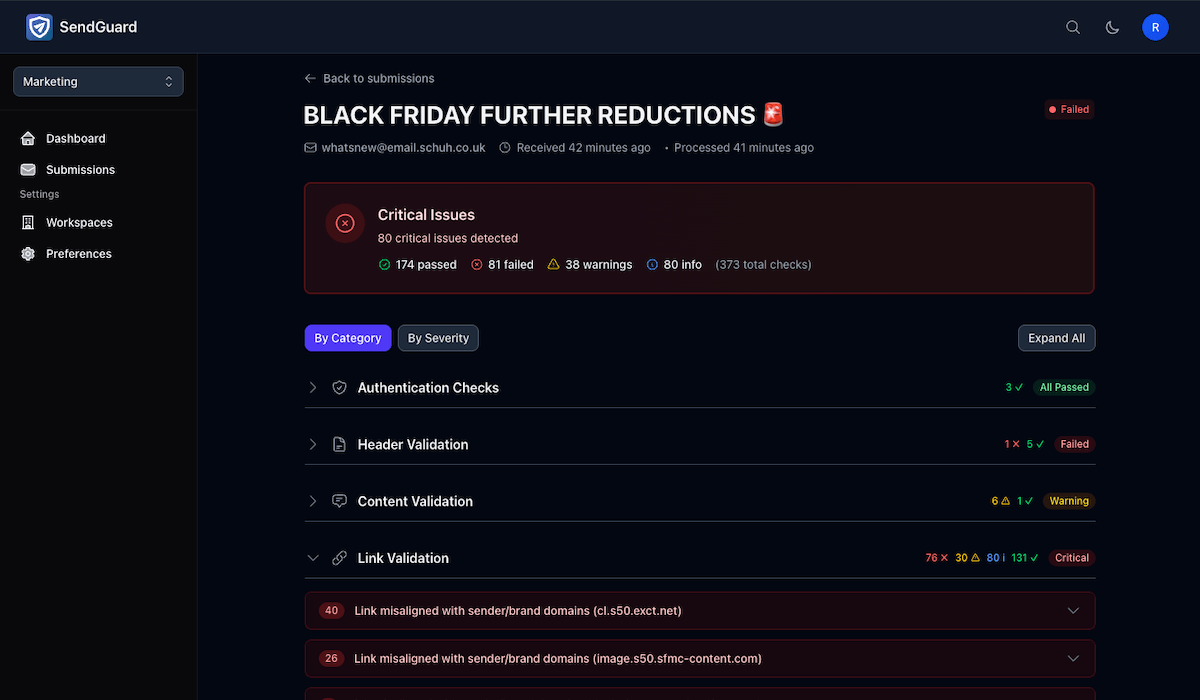
Every finding, with the evidence attached
The failing hop and its status code. The merge tag and where it survived. The header exactly as your ESP wrote it. Ranked, with a fix on each — no noise.
One email, two timelines
Which future do you want?
An illustrative scenario — the figures below are what a broken link can cost, not a specific customer's numbers.
Before SendGuard
Campaign goes out to 120,000 subscribers
The checkout link 404s — it worked in the draft
Black Friday slot ruined
Lost revenue from one broken link
$50,000
With SendGuard
Test campaign arrives at SendGuard from your ESP
"Checkout link returned 404" flagged as critical
Link fixed, new test passes, campaign scheduled
SendGuard cost for the year
< 1% of that campaign
What SendGuard actually checks
We check what keeps you up at night
The engine runs 17 checks on the email your ESP delivered. You'll mostly remember the 2–3 that just saved you.
Revenue-killing issues
- Checkout and landing links that return a 404
- Long or mixed-HTTP redirect chains behind the ESP click wrapper
- UTM parameters missing or malformed
Brand & embarrassment
- "Hi {{FirstName}}" merge tags that never filled in
- Tags leaking into the subject line, a link or image alt text
- Preheaders that truncate, subject lines that trip spam filters
Compliance & reputation
- List-Unsubscribe header missing, malformed, or not one-click
- Reply-To missing, malformed, or off-domain
- SPF, DKIM and DMARC results, and a Return-Path that doesn’t match your From
Deliverability & UX
- Images over 1MB, slow to load, or missing alt text
- Open-tracking pixels and the click-tracking domain your links resolve through
- Insecure http:// links and images
View all 17 checks
Every check we run
- Broken Link Detection
- Merge Tag Validation
- List-Unsubscribe Header
- Authentication Results
- Suspicious Link Patterns
- Image Optimization
- UTM Parameter Validation
- Subject Line Analysis
- HTML Structure
- Mobile-Render Risk Checks
- Alt Text Coverage
- Payload & Redirect Latency
- Tracking Domains & Pixels
- Text-to-Code Ratio
- Preheader Optimization
- HTTPS Enforcement
- Reply-To Validation
Built for every send
Cheap enough to run on all of them
Any ESP, every brand you run, unlimited scans on every paid plan. Nothing to rip out and nothing to migrate — it sits next to what you already use.
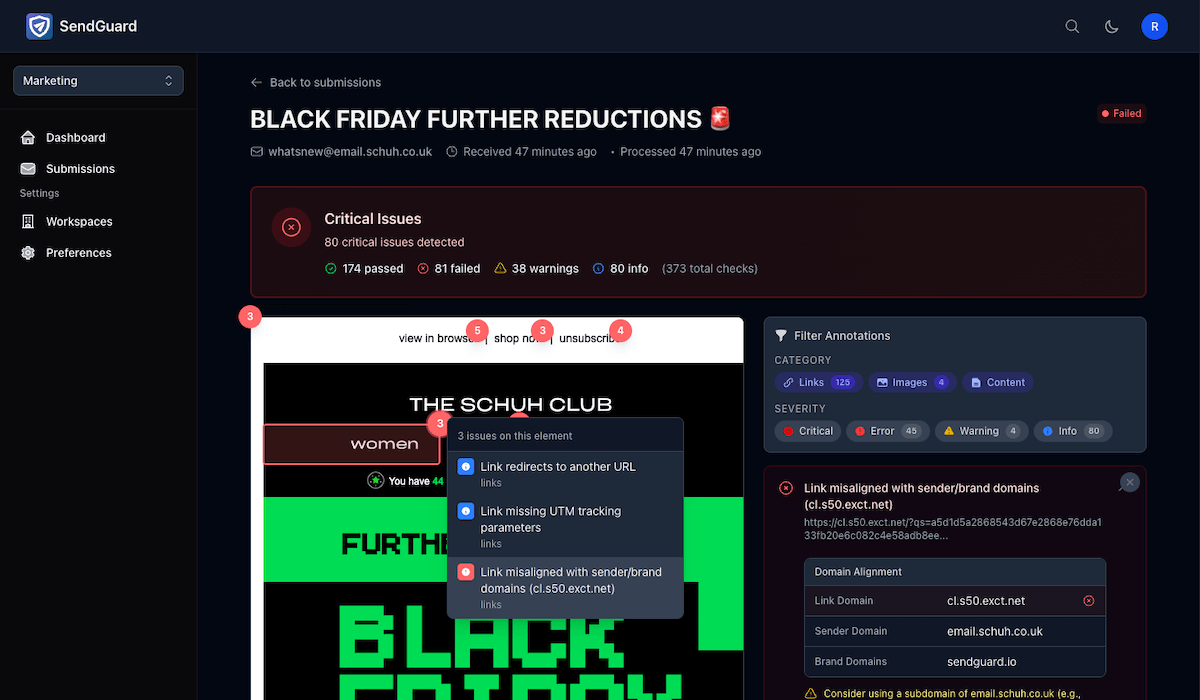
See exactly where the issue is
Findings are highlighted on the email we received, so you see the failing link or the leaked merge tag in context. No hunting through logs or deciphering error codes.
Send from ESP or forward as attachment
Works with any ESP — just add your SendGuard address as a test recipient. No integration needed. Or forward emails as attachments to test historic campaigns and templates.
Manage all your brands
Separate workspaces for each client or brand. Perfect for agencies.
Run it on every send, not just the big one
Unlimited scans on every paid plan, with no overage. The Tuesday re-send gets the same check as the flagship campaign.
Enterprise ready
Built for organizations that need security, compliance, and dedicated support at scale.
Where it fits
Fits into the 10 minutes before you hit 'Send'
Prepare campaign
Design email in Klaviyo, Mailchimp, HubSpot… as usual.
SendGuard check
Add your workspace address as a test recipient and send the campaign as usual. We read the message your ESP delivered and report what's broken.
Schedule & send
Ship your campaign, sleep better that night.
No code, no integration, no DNS changes.
If you can send a test email, you can use SendGuard.
From real scans
What we find in real marketing email
Not industry averages, not projections. Every one of these was a real marketing email we received from a live send — the same engine that will scan yours, counting what came back.
Based on 800+ real marketing emails from 89 brands, Oct 2025 – Jul 2026.
Across the campaigns we scanned
1 in 6
campaigns had a link that returned a 404
8 in 10
were missing a List-Unsubscribe header, or had a malformed one
3.2
issues found per campaign, on average
Key insight: Most issues are simple to fix once you know about them. The hard part is finding them before your subscribers do.
Works with campaigns from
Simple pricing
Priced to run on every send
Unlimited scans on every paid plan, no overage, nothing to ration. And if a single broken campaign costs you even $5k in lost revenue, you'd have to try very hard to make SendGuard not worth it.
FAQ
Common questions, straight answers
-
The email itself. You add a SendGuard address as a test recipient in your ESP and send as usual, and we read the message your ESP actually delivered — after personalisation, after link wrapping, after the headers were stamped on. No integrations, API keys, DNS changes, or account access.
-
No, and it isn't trying to. SendGuard doesn't render your email at all — no client previews, no screenshots, no dark-mode simulation. Keep the tool that shows you how a campaign looks. SendGuard is the pass that tells you whether it works.
-
Most of it carries over: your ESP builds, wraps and signs a test send the same way, so the links, headers and authentication results are the real ones. Two caveats worth knowing. Merge fields resolve against you as the recipient, so a tag that fills in here proves the field exists, not that every subscriber has a value for it — but a tag that fails here would have failed for the whole list. And some ESPs let you disable click tracking on test sends; leave it on if you want the link chain checked as subscribers will experience it.
-
We never send email to your subscribers, so your list and your sending reputation aren't touched. One thing to know: we request every link in the email to check where it lands, and because your ESP wraps those links, a test send can register clicks in your campaign's own reporting.
-
We store the content of your test emails for analysis and your check history. We never share or sell your data, and you can delete your check history at any time.
-
Adding SendGuard takes about 30 seconds — one more test recipient. The first report lands in about 60 seconds; a handful of link verdicts can settle a little later when a site puts up bot protection and we retry in a real browser.
-
Absolutely. Generate a test address right now, send a test email, and see your results — no signup required. When you want unlimited scans, sign up for a paid plan instantly.
What exactly do you check — the design, or the email itself?
Does SendGuard replace my preview tool?
A test send isn’t a production send. What does that change?
Will this affect our deliverability?
What data do you store?
Will this slow our team down?
Can I try it without talking to sales?
Run the second pass on your next send.
Keep the tool that shows you how it looks. Add the one that tells you whether it works — you'll either fix something that mattered, or sleep better knowing there was nothing to fix.